1.0 Release Date: November 6, 2026
We are excited to announce that TFC2: Collapse of the Bronze Age will soon hit 1.0, which will conclude the Campaign Mode with Story Act 4 and include the Map Editor!
Watch the announcement trailer:
New Art Style Out Now!
We've changed the art style to improve readability. What does this mean?
The Previous Art Style
With the old art style (below), it's not as easy to distingush units from the environment. Especially when a villager stands above brown ground like here, the unit's pixels and the ground's pixels meshes into each other. The case is also the same for buildings and units, as well as buildings and the ground, even though the problem is more prevalent with units because of their lower pixel count.
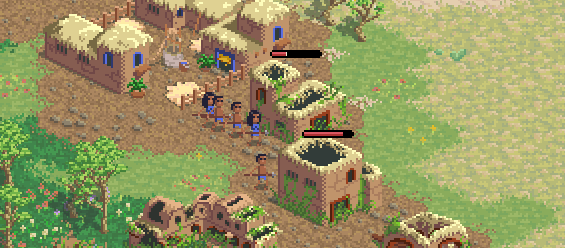
We've also received feedback from time to time saying that units are hard to distinguish from each other.
Thinking hard about this, we discovered the problem was a lack of tonal hierarchy. Imagine a platform game with no differences between the foreground and background. How do you know where you can move and jump to? Although we don't have that issue in an RTS, we still have the issue of lots of things happening at once, and we should make it as easy as possible to process the whole picture.
The Update Art Style
So we changed it to this:
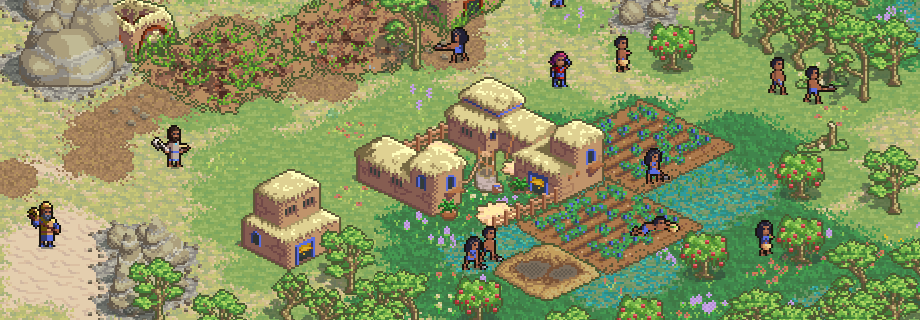 Ahhh.. much easier to spot the units and see what they're up to... notice how the brain has to work less doing this?
The outlines solves this issue for us, by framing in the units, so that pixels don't blend into each other like before. Buildings and resources also get an outline, but more subtly. By having a stronger outline for units, the hierarchy is improved from no hierarchy whatsoever to: units > buildings and other map objects > ground and other assets you can't really interact with.
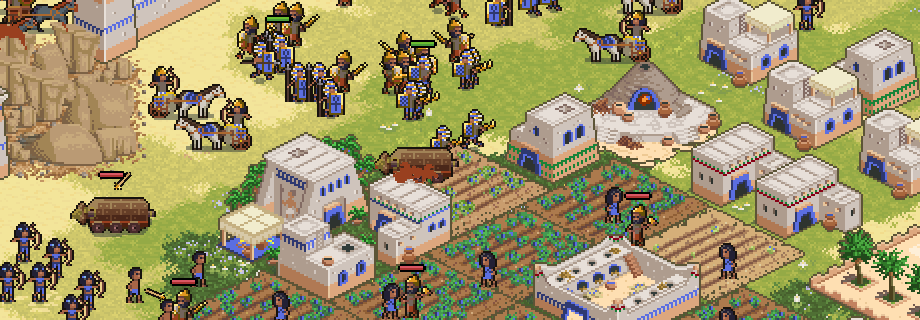 We look forward to see what you think about it in-game!
Don't like the new aesthetics? Don't worry, you can toggle off outlines in settings. That way you revert to the old style.
The new art updates are available to play now!
Change Log v0.532
New
- Updated art style
- Outlines can be toggled off in settings if you prefer the old art style
General
- When selecting building or resource the outline gets colored green (which replaces the selection rectangles)
- Improved rendering of health bars and unit indicators so they overlap and render on top of each other correctly
- Updated sfx for trade resource buttons
- Will only change mursor cursor grabbing food crate if one or more villagers are currently selected
- Improved effect of picking up food crate
- Influence range and tower range tiles render above farms and road tiles
- Smooth fade out from main menu to cut scene when starting new campaign
- Updated game logo in main menu
Missions
- Oglum no longer stands on top of a royal guard in meeting the king scene in mission 4
- Replaced stone fence with walls for village in mission 7
- Updated mission objective in mission 10 to make it more clear what the objective is
- Changed wording of secondary objective in mission 11
Balance
- Skirmish AI orders slightly less villers to defend (due to slight increase in perceived power score for villager)
Localization
- Added localization strings to market send resources panel
- Added localization strings to market button tooltips
- Added missing localization for secondary objective in mission 11
- Added missing localization for Nusku
Bugs
- Fixed a problem with pathfinding that caused a group of units moving to a position to keep playing their walk animation if not able to find a path through other units
- Fixed problems with Skirmish AI scout behavior (could prevent AI from finding enemies thus never attacking anyone)
- Waypoint flag follows target unit
- Fixed stray pixels, rendering order issues, and more, for certain sprites, like the food crate
- Fixed selected controller portrait box being transparent
- Fixed crash when opening hotkeys for spectator panel
- Loading snapshot of improved watchtower will show top part
- When farms change player ownership the minimap is updated
- Health bars update color when changing player to follow in spectator mode